Gemini AI Photo Prompt Copy Paste: The Ultimate 2026 Master Guide (Indian Edition)
Have you ever tried to generate a photo of yourself, but the AI changes your face? You look like a stranger. It is frustrating.
The problem isn’t you. The problem is your prompt.
In 2026, the new Gemini “Nano Banana” model creates miracles, but only if you speak its language. You cannot just say “Boy in a car.” You must describe the lens, the lighting, the fabric texture, and—most importantly—tell the AI to LOCK your face.
This guide contains 30+ Ultra-Detailed, Professional Prompts. These are not simple sentences. They are complex “Mega-Prompts” designed to force Gemini to give you 8K, DSLR-quality results while keeping your face 100% real.
The “Subject-Lock” Technique (Read Before Copying)
To make these prompts work perfectly, follow this simple rule:
- Upload your photo to the Gemini chat.
- Copy a prompt from the list below.
- Paste it into the chat box.
⚠️ IMPORTANT: We use the word “SUBJECT” in every prompt. This command is crucial. It tells Gemini: “Do not create a fake person. Use the person in the photo I just uploaded.”
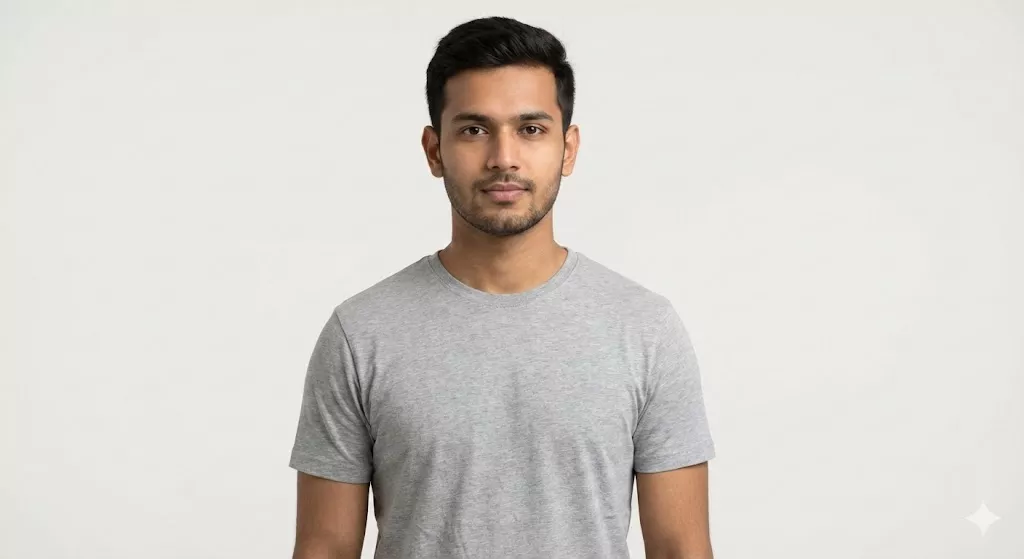
For this experiment, we will use the following ‘Base Photo’ to test every single prompt listed below.
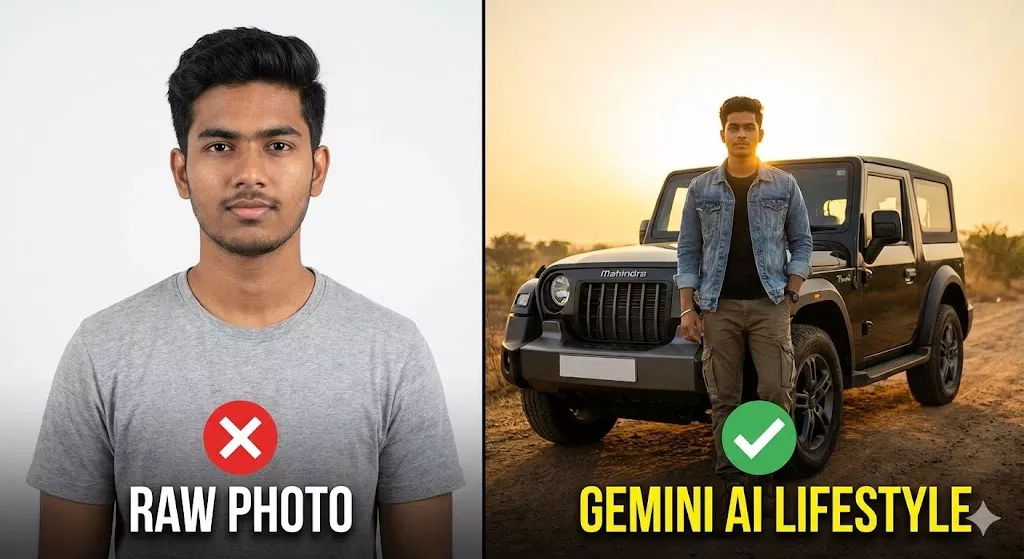
Example: See the power of a good prompt in action. Here is how that same simple selfie transforms into a rugged lifestyle shot and a 3D character, all while keeping the face 100% real.

Category 1: Men’s Viral Lifestyle (Desi Swag)
This Gemini Prompt is Best for: Instagram Reels, WhatsApp DPs, and Tinder Profiles.
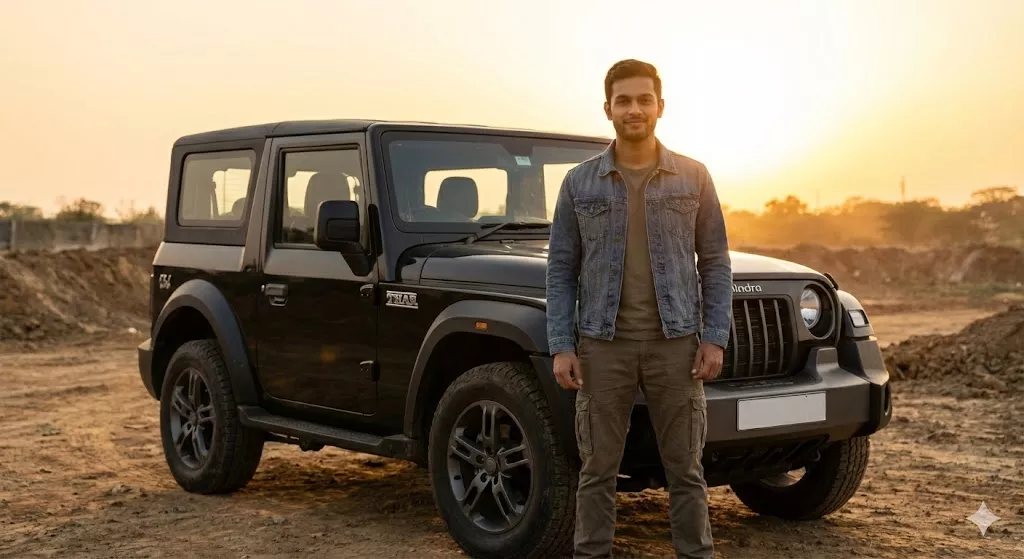
1. The “Mahindra Thar” Off-Road King
“Generate a hyper-realistic, 8K resolution lifestyle portrait of the subject standing confidently next to a rugged, modified matte-black Mahindra Thar with wide off-road tires. The subject is dressed in a rugged traveler aesthetic: an olive green cargo jacket layered over a black t-shirt, distressed denim jeans, and sturdy timberland-style boots. The background captures a dusty, cinematic highway in Rajasthan during the ‘Golden Hour,’ creating a warm, heroic rim-light around the subject. The camera angle is low-angle to make the subject look dominant and powerful. CRITICAL INSTRUCTION: Strictly preserve the facial identity, skin tone, beard structure, and body proportions of the subject from the uploaded image. Do not alter facial features. Ensure the lighting on the face matches the sunset environment naturally.”
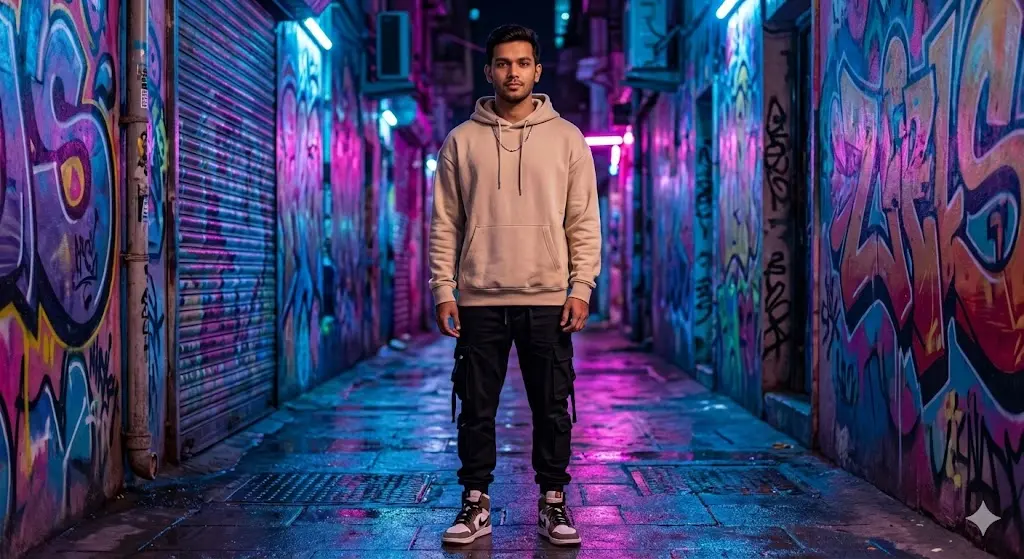
2. The Urban “Gully Boy” Street Fashion
“Transform the subject into a high-fashion streetwear icon. Place the subject in a vibrant, neon-lit alleyway in Mumbai at night, surrounded by colorful graffiti art and wet pavement reflections (cyberpunk vibe). Change the subject’s outfit to a premium oversized beige hoodie, black cargo joggers with multiple pockets, and high-top sneakers. Accessories include a silver chain and a modern digital watch. Shot on a Sony A7R IV with an 85mm lens at f/1.8 to create a creamy ‘bokeh’ background blur. CRITICAL INSTRUCTION: The face, hair, and expression of the subject must remain 100% identical to the source image. Blend the neon blue and pink lighting onto the subject’s clothes realistically, but keep the skin tone natural.”
3. The “Superbike” Rider (KTM/Ninja)
“Edit the image to seat the subject on a Kawasaki Ninja ZX-10R or KTM Duke 390 superbike. The bike should be detailed with realistic chrome reflections. The subject is wearing a protective armored rider jacket (black and neon green accents), riding gloves, and dark jeans. The helmet is resting on the bike tank. The background is a blurred city bridge at twilight with trailing car lights (long exposure effect). CRITICAL INSTRUCTION: Maintain high fidelity to the subject’s original face. Ensure the subject’s hands are gripping the handlebars naturally. Do not generate a helmet on the head; keep the face visible and unaltered.”
4. The “Gym Motivation” Aesthetic
“Place the subject in a high-end, luxury gym environment with dark, moody lighting. The subject is holding a dumbbell or standing near a squat rack. Change the outfit to a branded, sweat-wicking athletic vest (showing arm definition if applicable) and gym shorts. Use dramatic ‘Rembrandt Lighting’ to highlight the subject’s natural physique without making it look fake or cartoonishly muscular. CRITICAL INSTRUCTION: Use the subject’s actual body type from the original photo—do not artificially inflate muscles. Keep the facial identity, jawline, and hairstyle exactly as they appear in the upload.”
Category 2: Women’s Fashion & Glamour
Best Prompt for: Wedding Season, Travel Blogs, and Aesthetic Posts.
5. The “Sabyasachi” Royal Bride
“Transform the subject’s attire into a luxurious, deep maroon heritage bridal lehenga featuring intricate gold Zardosi embroidery and velvet textures. Adorn the subject with heavy Kundan jewelry (necklace, maang tikka, and nose ring). The background is the corridor of a heritage Indian palace (like Udaipur Lake Palace) with blurred archways and marigold decorations. Shot on a Canon EOS R5 with soft, flattering natural light. CRITICAL INSTRUCTION: The jewelry and outfit must drape naturally over the subject’s original neck and body shape. Strictly preserve the facial features, eye shape, and makeup style of the subject. Do not ‘whitewash’ or alter the skin tone.”
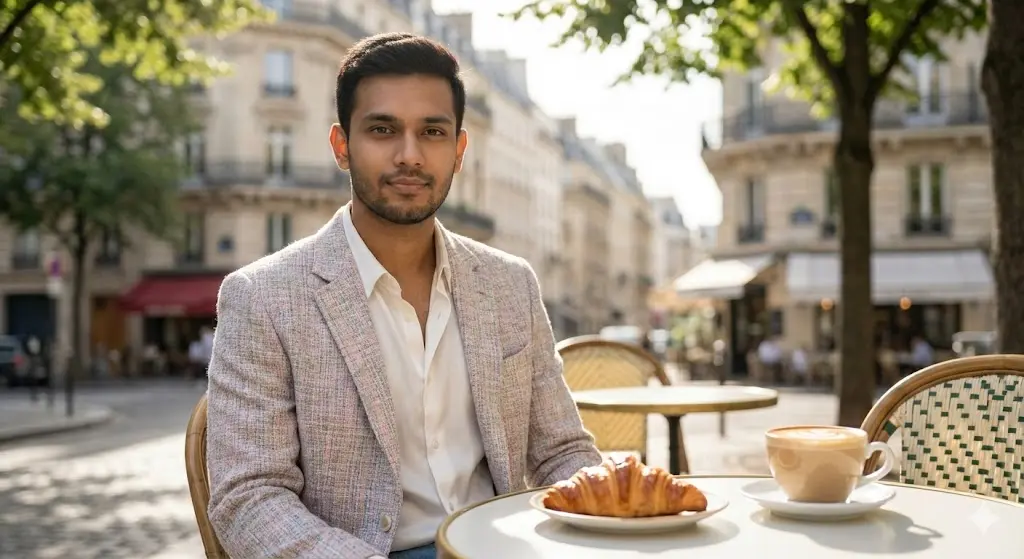
6. The “Parisian Cafe” Influencer
“Place the subject seated at a small white table in a charming outdoor cafe in Paris or South Bombay. There is a croissant and a latte with latte art on the table. Change the subject’s outfit to a chic, ‘Old Money’ aesthetic: a soft pastel tweet blazer, a white silk blouse, and pearl earrings. The lighting is soft morning sunlight filtering through trees (dappled light effect). CRITICAL INSTRUCTION: Ensure the subject looks candid and relaxed. The face must remain 100% identical to the source photo. Blend the subject seamlessly into the chair and background.”
7. Snowy Winter Wonderland (Manali/Kashmir)
“Transport the subject to a magical snowy street in Manali or Switzerland. The trees are covered in fresh white snow. Change the subject’s outfit to a cute, fluffy pink faux-fur jacket, a white woolen beanie cap, and a warm scarf. Add realistic falling snowflakes in the foreground and background depth. CRITICAL INSTRUCTION: Adjust the lighting on the subject’s face to be cool and soft (overcast winter light). Add a subtle rosy tint to the cheeks for realism. Strictly keep the facial identity locked to the original upload.”
8. The “Corporate Boss Lady” (LinkedIn)
“Crop and edit the image to create a powerful professional headshot. Change the subject’s outfit to a sharp, tailored navy blue business suit with a crisp white shirt. The background is a blurred, modern glass office building with a city skyline view. The lighting should be studio-quality ‘Butterfly Lighting’ to illuminate the face evenly. CRITICAL INSTRUCTION: Remove any blemishes or flyaway hair, but strictly preserve the facial structure, nose shape, and smile of the subject. Make it look like a Fortune 500 CEO profile picture.”
Category 3: Couples & Relationships
Best AI Prompt for: Anniversaries and Pre-Wedding Shoots.
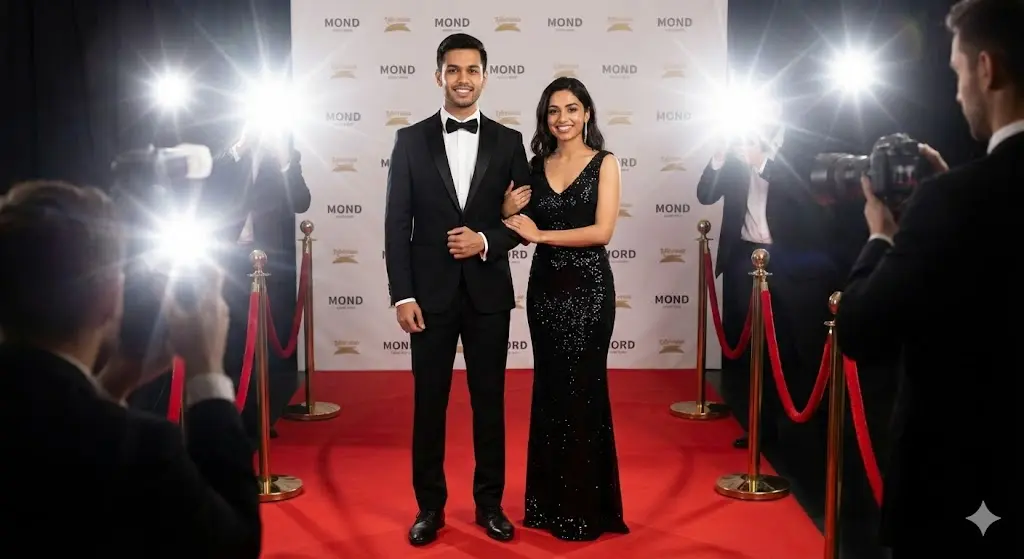
9. The “King & Queen” Power Couple
“Edit the photo of the two subjects. Transform their outfits into high-fashion ‘Black Tie’ evening wear. The male subject wears a tuxedo with a bowtie; the female subject wears an elegant black sequin evening gown. Place them on a red carpet event background with paparazzi camera flashes blurring in the distance. CRITICAL INSTRUCTION: Keep the height difference and body language of the two subjects exactly as they are in the original photo. Both faces must remain 100% identical to the source. Do not swap faces.”
10. Traditional South Indian Wedding
“Transform the attire of the two subjects into traditional South Indian wedding wear. The male subject wears a cream silk shirt and Veshti (dhoti) with a gold border. The female subject wears a rich Kanjeevaram silk saree in emerald green and pink. The background is a temple entrance adorned with banana leaves and jasmine flowers. CRITICAL INSTRUCTION: Ensure the fabric textures look like real silk. Strictly preserve the facial identities and skin tones of both subjects.”
Category 4: Creative 3D Art & Viral Trends
Best Gemini script for: Fun, Cartoons, and Gaming Profiles.
11. The “Disney Pixar” 3D Character
“Reimagine the subject as a high-quality 3D animated character in the style of a modern Pixar or Disney movie. The character should have big expressive eyes and smooth 3D skin texture but must retain the subject’s key identifiers (hair color, glasses style, beard, clothing colors). The background is a colorful, animated version of an Indian street market. CRITICAL INSTRUCTION: This is a caricature style, but the subject must still be instantly recognizable to their friends. High-gloss 3D render finish.”
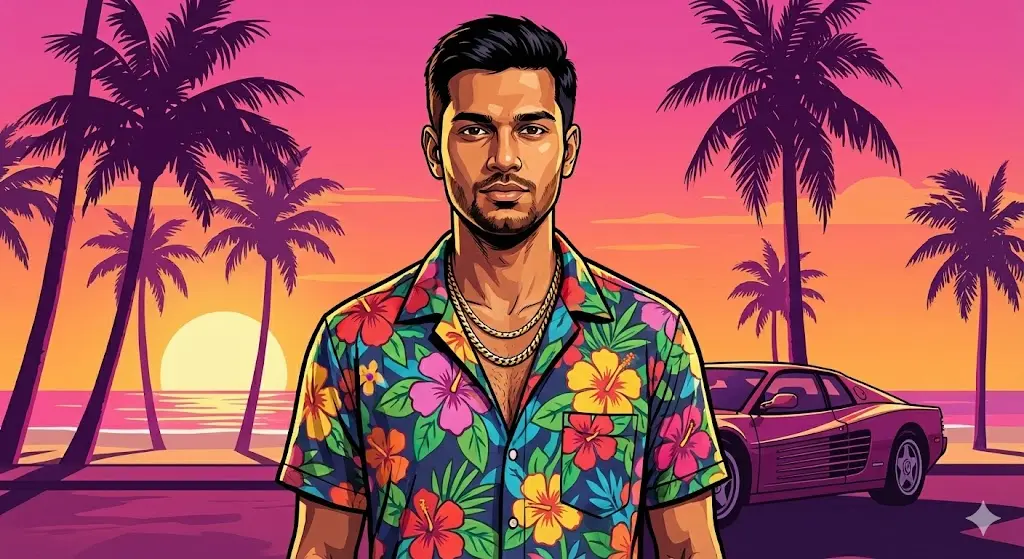
12. The “GTA VI” Loading Screen Art
“Convert the subject’s photo into the iconic art style of Grand Theft Auto (GTA) loading screens. Use bold black outlines, cel-shaded coloring, and high contrast. Change the background to a sunset beach with palm trees (Vice City vibe). Give the subject a confident, tough expression. CRITICAL INSTRUCTION: Keep the facial structure recognizable but stylized as a digital painting. Ensure the artwork looks like a hand-painted illustration.”
Category 5: Professional Utility (Fix Your Photos)
Best Ai Script for: Fixing bad photos without Photoshop.
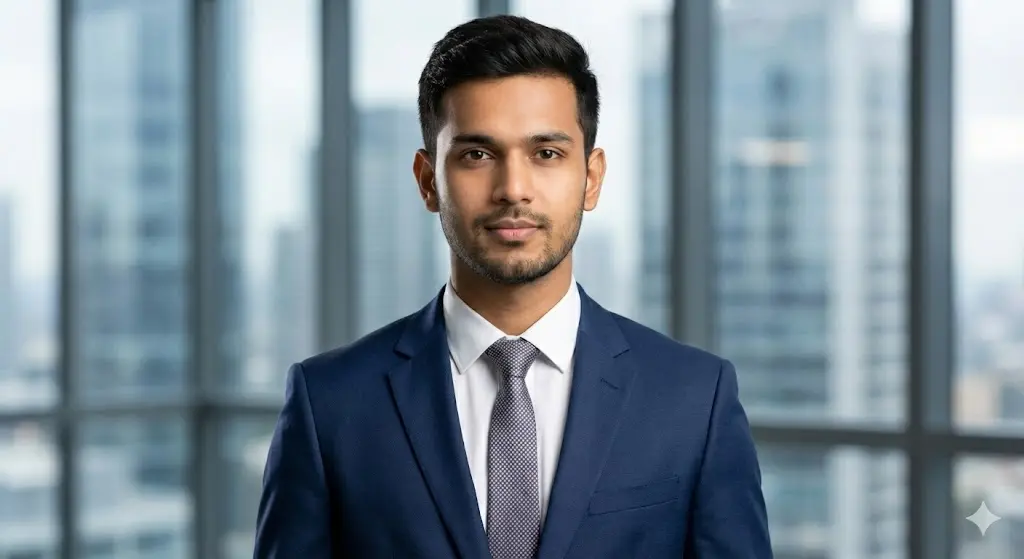
13. The “Passport Photo” Fixer
“Crop the subject to a standard 2×2 inch passport photo ratio. Change the background to a clean, flat white color. Change the subject’s outfit to a formal black suit and tie. Fix any shadows on the face to ensure even, flat lighting suitable for official documents. CRITICAL INSTRUCTION: Do not beautify the face or alter features—this must be accurate for identification purposes. Keep the face 100% real.”
14. “Golden Hour” Relighting Tool
“Keep the subject’s clothes and background exactly as they are, but completely change the lighting. Relight the subject as if they are facing a sunset. Add a warm, golden-orange glow to the skin and hair (rim light). Deepen the shadows slightly for cinematic contrast. CRITICAL INSTRUCTION: Do not change the location or outfit. Only modify the light and color grading to make the photo look professional and warm.”
Category 6: Indian Traditional & Festive (Men)
Best Gemini AI Prompt for: Eid, Diwali, and Wedding Functions.
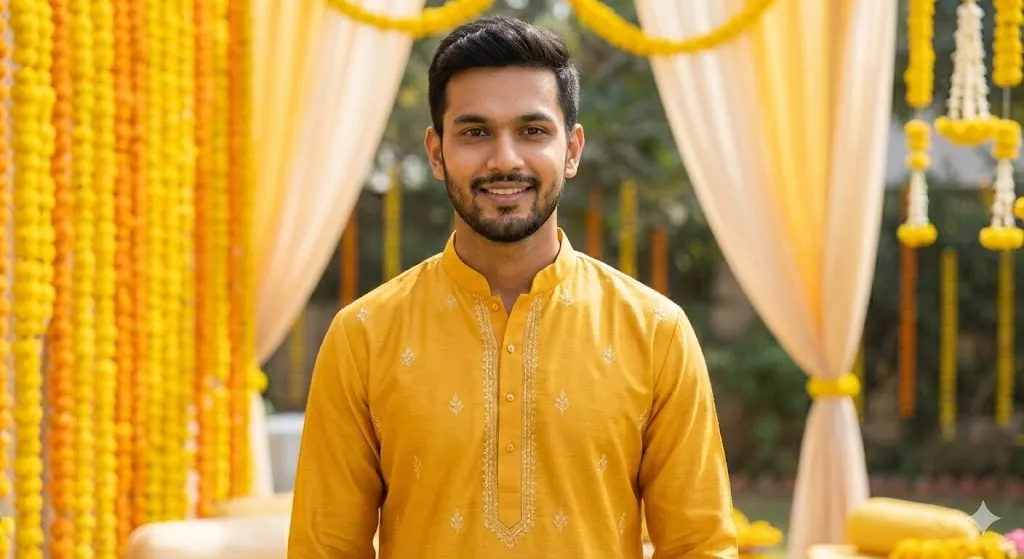
15. The “Royal Kurta” Haldi Ceremony
“Transform the subject into a festive groom or guest at a Haldi ceremony. Dress the subject in a bright mustard-yellow Kurta with subtle white embroidery. The background is a vibrant outdoor daytime event with yellow marigold flower decor and soft drapes. The lighting is bright and sunny. CRITICAL INSTRUCTION: Ensure the fabric of the Kurta looks like high-quality cotton or silk. Strictly preserve the subject’s facial identity, beard style, and smile. Do not alter skin tone; keep it natural and warm.”
16. The “Pathani Suit” Eid Look
“Edit the photo to dress the subject in a crisp, black Pathani suit with the sleeves rolled up comfortably. Place the subject in an evening setting with a blurred view of a mosque minaret or moonlit sky in the background. The lighting should be cool and cinematic (moonlight effect). CRITICAL INSTRUCTION: The fit of the suit should look tailored to the subject’s original body shape. Keep the subject’s face 100% identical to the upload. Add a digital watch on the wrist if hands are visible.”
Category 7: Indian Traditional & Festive (Women)
Gemini AI Script Best for: Guest Looks and Office Parties.
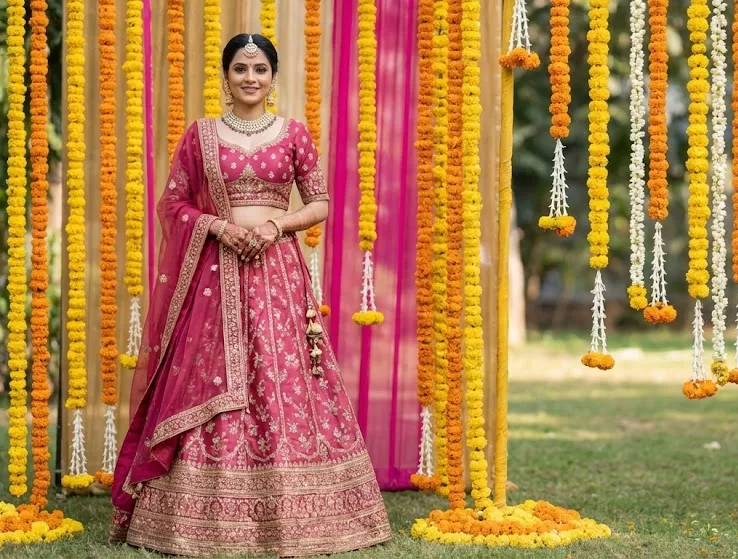
17. The “Sharara Suit” Wedding Guest
“Change the subject’s outfit to a stylish pastel green Sharara suit with silver Gota Patti work. The background is a luxury wedding banquet hall with chandeliers and floral arrangements. Shot on an 85mm lens to blur the background slightly. CRITICAL INSTRUCTION: The dupatta should drape naturally over the subject’s shoulder. Strictly preserve the subject’s facial features, makeup style, and hair volume. Do not beautify or change the face shape.”
18. The “Cotton Saree” Intellectual/Office Look
“Dress the subject in a sophisticated, handloom cotton saree (indigo or earthy tones) with a high-neck blouse. Place the subject in a library or an art gallery setting. The vibe is elegant, smart, and artistic. CRITICAL INSTRUCTION: Ensure the saree pleats look realistic. The lighting should be soft, indoor gallery lighting. Strictly maintain the subject’s original facial identity and glasses (if worn in original).”
Category 8: Aspirational Careers (Professional Swaps)
Best copy paste prompt for: Visualization and Fun.
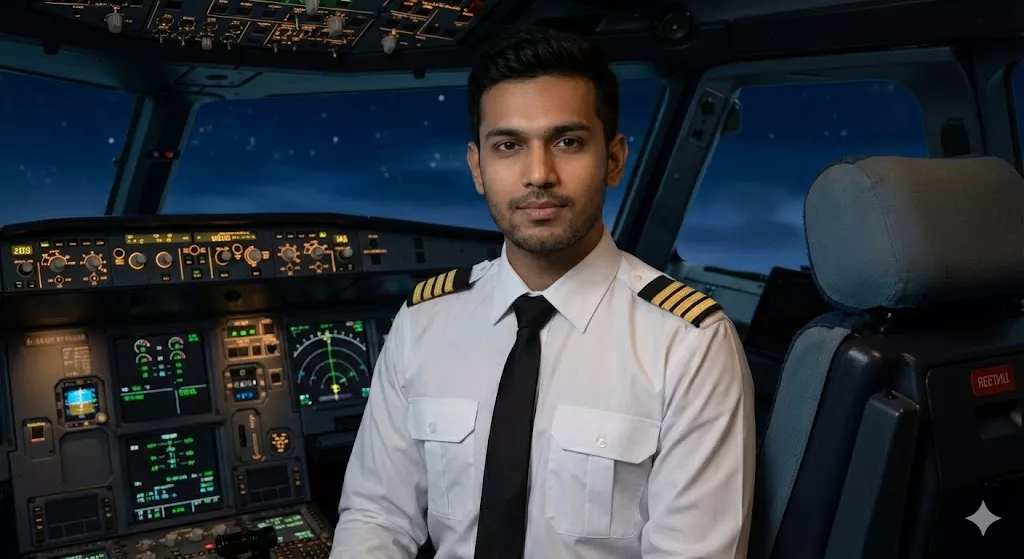
19. The “Commercial Pilot” Cockpit Shot
“Place the subject in the pilot’s seat of a commercial airliner cockpit. Dress the subject in a professional white pilot uniform with shoulder epaulets and a tie. The background shows illuminated dashboard controls and a night sky view through the windshield. CRITICAL INSTRUCTION: The uniform must fit the subject’s original shoulder width perfectly. Keep the subject’s face, hair, and expression exactly as they are. Make it look like a proud career milestone photo.”
20. The “Tech CEO” Stage Keynote
“Place the subject on a large stage with a dark background and a spotlight, similar to an Apple or Google product launch event. Dress the subject in a smart-casual black t-shirt and jeans (Steve Jobs/Tech style). CRITICAL INSTRUCTION: The lighting should be dramatic, hitting the subject from above. The subject looks confident. Strictly preserve the facial identity and body language of the source photo.”
21. The “Army Officer” Uniform
“Transform the subject’s attire into a respectful, highly detailed Indian Army combat uniform (camo pattern). Background is a blurred outdoor terrain or misty mountain border post. CRITICAL INSTRUCTION: Ensure the uniform badges and fit look authentic. Do not add a weapon; keep the pose neutral and proud. Strictly preserve the subject’s face, mustache/beard, and serious expression.”
Category 9: Travel & Luxury Lifestyle
Copy Paste Gemini Prompt for: Travel Goals.
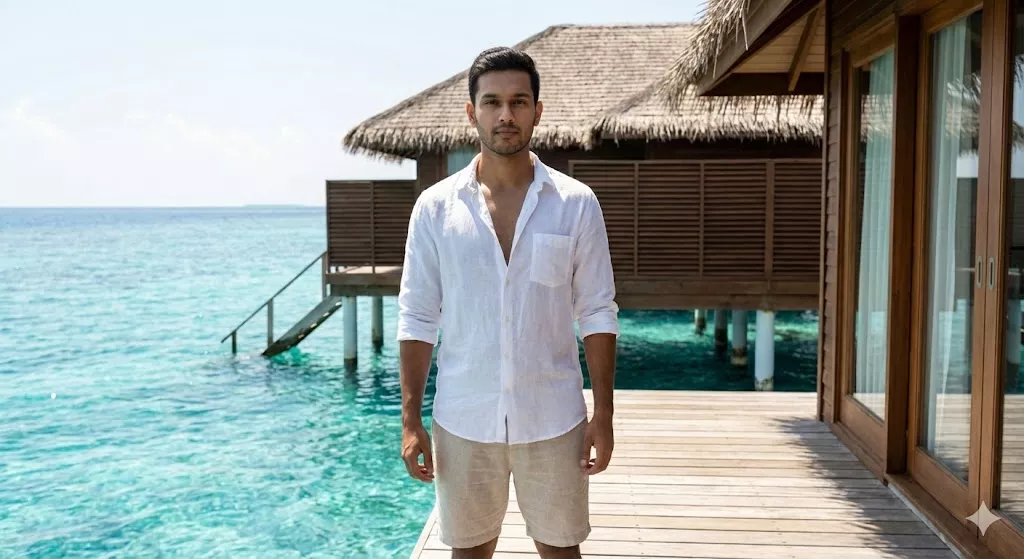
22. The “Maldives” Overwater Villa
“Transport the subject to a wooden deck of a luxury water villa in the Maldives. The ocean water below is turquoise blue. Dress the subject in a relaxed white linen shirt and shorts. The sun is shining bright overhead. CRITICAL INSTRUCTION: Add sunglasses to the subject (optional, or keep eyes visible). The lighting must be harsh tropical sunlight. Strictly preserve the subject’s facial structure and tan.”
23. The “New York Times Square” Night
“Place the subject in the middle of Times Square, New York, at night. The background is filled with massive, bright LED billboards and yellow taxi cabs. Dress the subject in a stylish leather jacket and winter scarf. CRITICAL INSTRUCTION: The colorful lights from the billboards should reflect on the subject’s clothes and face. Keep the subject’s face 100% identical to the source image.”
24. The “Desert Safari” Dubai
“Place the subject in the middle of red sand dunes in Dubai. A Land Cruiser is visible in the far background. Dress the subject in a flowing white kandura or casual travel clothes with a headscarf (keffiyeh) loosely draped. CRITICAL INSTRUCTION: The lighting should be golden and warm. Strictly preserve the subject’s facial features. Ensure the sand texture looks hyper-realistic.”
Category 10: Creative & Artistic Concepts
Best for: Profile Pictures with a Twist.
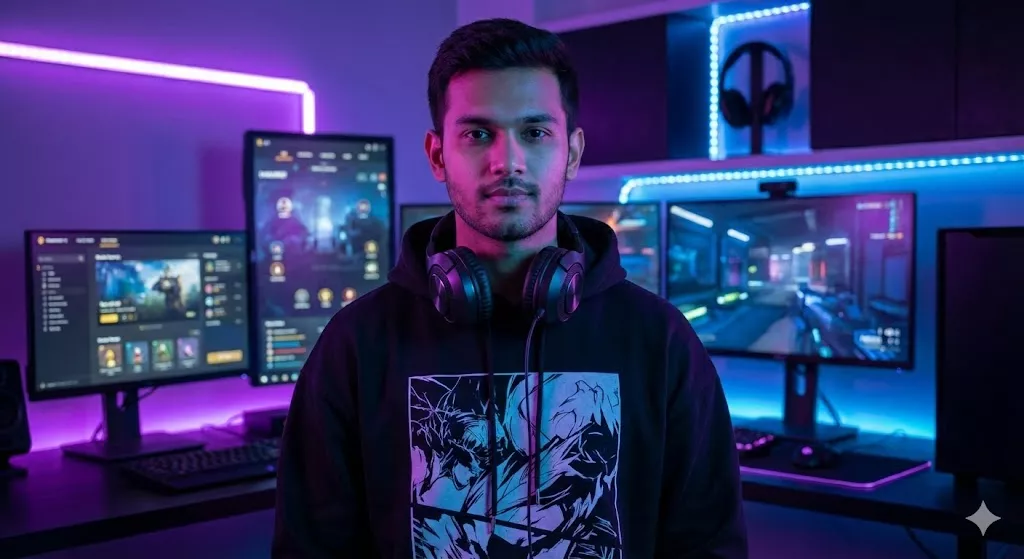
25. The “Cyberpunk Gamer” Room
“Place the subject in a high-tech gaming room setup with multiple monitors and RGB lighting strips (purple and blue). Dress the subject in a graphic oversized hoodie and gaming headphones around the neck. CRITICAL INSTRUCTION: The LED lights should cast a colored glow on the subject’s face. Keep the subject’s expression and facial features exactly the same as the upload.”
26. The “Vintage 1950s” Black & White
“Convert the photo into a classic 1950s black and white film portrait. Dress the subject in a vintage suit (for men) or polka dot dress (for women). Add film grain, scratches, and a vignette effect to make it look like an authentic old photograph. CRITICAL INSTRUCTION: Do not just remove color; change the contrast to match old film stock. Strictly preserve the subject’s face.”
27. The “Oil Painting” Masterpiece
“Transform the photo into a classical Renaissance-style oil painting. The subject is wearing royal velvet robes. The background is a dark, moody castle interior. CRITICAL INSTRUCTION: The texture of the image should look like brush strokes on canvas. The subject’s face remains recognizable but stylized as a painting.”
28. The “Neon Noir” Rain
“Place the subject under a transparent umbrella on a rainy night street. Neon red and blue signs are reflecting in the puddles. The subject is wearing a dark trench coat. CRITICAL INSTRUCTION: Raindrops should be visible on the umbrella and coat. The mood is mysterious. Strictly preserve the subject’s facial identity.”
Category 11: Sports & Action
Best for: Sports Fans.
29. The “Football Star” Pitch
“Place the subject on a professional football pitch at night under floodlights. Dress the subject in a professional football kit (e.g., Lionel Messi or Ronaldo style jersey). The subject is holding a football under one arm. CRITICAL INSTRUCTION: The grass should look wet and realistic. Sweat droplets on the subject’s skin for realism. Strictly preserve the face.”
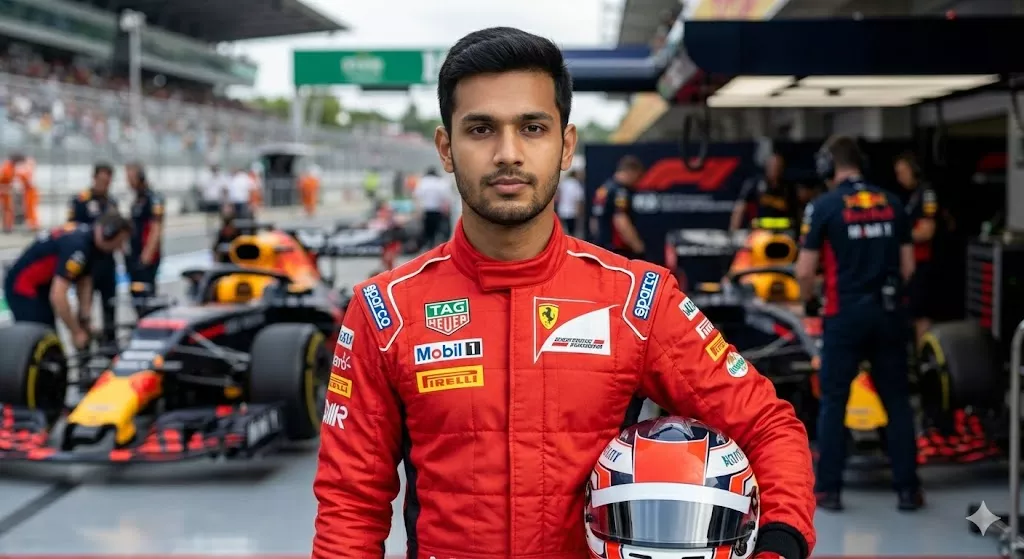
30. The “F1 Driver” Paddock
“Dress the subject in a professional Formula 1 racing suit (red or black). Background is the F1 pit lane with race cars and mechanics blurred behind. CRITICAL INSTRUCTION: The suit should have realistic sponsorship logos (blurred). The subject is holding a racing helmet. Strictly preserve the facial features and hair.”
Category 12: Everyday Utility (Fixes)
Best for: Quick Edits.
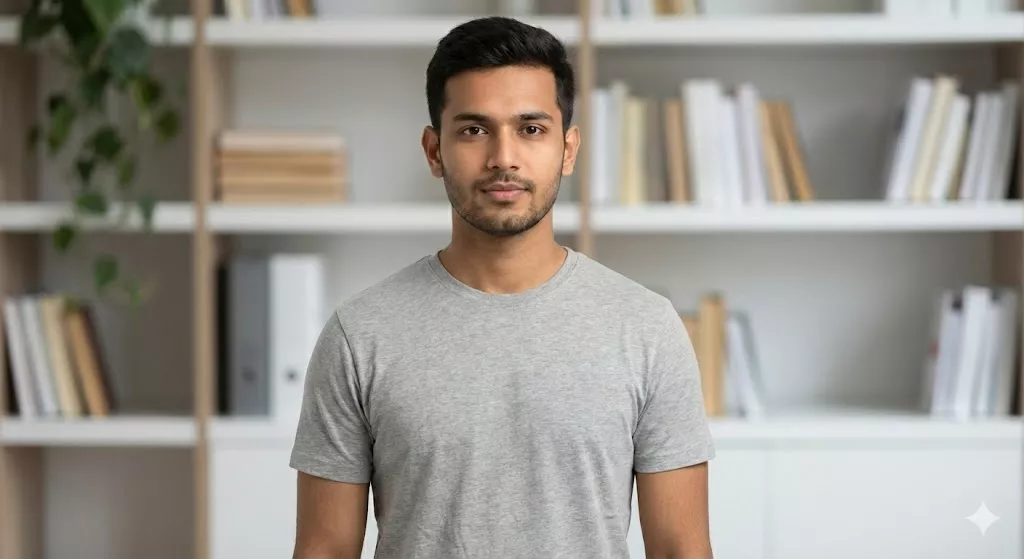
31. The “Zoom Meeting” Background Fix
“Keep the subject exactly as they are (clothes and face) but replace the messy room background with a clean, modern, blurred home office shelf with books and plants. CRITICAL INSTRUCTION: The lighting on the subject must match the new indoor background. Do not alter the subject at all, just the environment.”
32. The “Group Photo” Add-In (For 2+ People)
“Insert the subject into a group of friends sitting at a dinner table. (Use this prompt when uploading a photo of yourself to merge with a group background). CRITICAL INSTRUCTION: Match the lighting and resolution of the subject to the group photo so it doesn’t look pasted. Strictly preserve the subject’s face.”
How to Customize These Prompts (Make It Yours)
You will notice brackets or specific details in the prompts above. You can easily change them to fit your needs!
- Don’t like the “Navy Blue Suit”? Change the text to “Black Tuxedo”.
- Don’t like “Paris”? Change the text to “Kerala Backwaters”.
The key is to keep the rest of the long, detailed description the same. The details about lighting, camera lens, and “Subject Lock” are what make the magic happen.
Ready to Edit? Scroll up, copy the “Mahindra Thar” prompt, upload your photo to Gemini, and watch your ordinary selfie turn into a masterpiece!
Frequently Asked Questions
Is Gemini AI photo editing free to use in India?
Yes, the standard version of Gemini AI (Nano Banana model) is free for all users in India. You can generate and edit unlimited images daily. However, for ultra-high-resolution (8K) downloads or faster processing, you may need a Google One subscription.
How do I keep my face exactly the same in Gemini AI photos?
To keep your face 100% real, you must use the “Subject-Lock” technique. When writing your Gemini AI photo prompt, always refer to yourself as the “Subject” and add the command: “Strictly preserve facial identity and skin tone.” This tells the AI to edit the background and clothes but lock your facial features.
Can I use these Gemini AI photo prompts for Instagram Reels and WhatsApp DPs?
Absolutely! The prompts in this guide are specifically designed for social media trends like Instagram 3D avatars, WhatsApp status updates, and Tinder profiles. The generated images are high-quality and safe to share on any platform.
Can I write Gemini AI prompts in Hindi or Hinglish?
Yes, Gemini is highly advanced in 2026 and understands Indian languages perfectly. You can copy the prompts from this article and translate them into Hindi, or even mix languages (Hinglish). For example, you can type: “Subject ko ek festive Indian wedding background mein dikhao.”
Are Gemini AI-generated images copyright-free for YouTube thumbnails?
Generally, yes. Images generated by Gemini AI are free to use for personal and commercial projects, including YouTube thumbnails and blog posts. However, always check Google’s latest 2026 terms of service to ensure you are compliant with commercial usage policies.
What should I do if the AI changes my body shape or skin color?
If the result looks inaccurate, your prompt needs more detail. Add specific instructions like “Keep natural skin texture” or “Maintain original body proportions.” Avoid using generic words like “handsome boy” or “beautiful girl” as these trigger the AI to beautify the face; instead, stick to the word “Subject.”
Is it safe to upload my personal photos to Gemini AI?
Google implements strict privacy measures, and your photos are generally used only for the immediate editing session. However, it is recommended never to upload sensitive documents (like Aadhar cards or passports) or highly private photos to any public AI tool. Use it for lifestyle and fun edits only.
Disclaimer: All images featured in this guide were generated using Google Gemini AI for illustrative purposes. While the “Subject-Lock” technique is designed to preserve facial features, results may vary depending on the lighting and quality of your uploaded photo. We are not affiliated with Google, and users are advised to verify the latest copyright laws and avoid uploading sensitive personal documents to public AI tools.